Pages

Wednesday, July 13, 2011

Using PowerShell to manage SQL Server Compact database files

I noticed that someone asked if you could manage SQL Server Compact from PowerShell, and yes you can, based on the reply here I put together the following sample:

[Reflection.Assembly]::LoadFile(“C:\Program Files\Microsoft SQL Server Compact Edition\v3.5\Desktop\System.Data.SqlServerCe.dll”)

$connString = "Data Source=C:\data\sqlce\test\roads.sdf"
$cn = new-object "System.Data.SqlServerCe.SqlCeConnection" $connString

# create the command
$cmd = new-object "System.Data.SqlServerCe.SqlCeCommand"
$cmd.CommandType = [System.Data.CommandType]"Text"
$cmd.CommandText = "SELECT TOP (100) * FROM Road"
$cmd.Connection = $cn

#get the data
$dt = new-object "System.Data.DataTable"

$cn.Open()
$rdr = $cmd.ExecuteReader()

$dt.Load($rdr)
$cn.Close()

$dt | Out-Default | Format-Table

READ MORE - Using PowerShell to manage SQL Server Compact database files

Sunday, July 3, 2011

Windows Phone / SQL Server Compact resources

This blog post collects links to relevant blog posts and articles about Windows Phone support for SQL Server Compact. You can also follow me on Twitter (@ErikEJ) to get notified of any SQL Server Compact related news.

MSDN

Local Database Overview for Windows Phone

How to: Create a Basic Local Database Application for Windows Phone

How to: Create a Local Database Application with MVVM for Windows Phone

How to: Deploy a Reference Database with a Windows Phone Application

Walkthrough: Updating a Local Database Application for Windows Phone

Local Database Best Practices for Windows Phone

Local Database Connection Strings for Windows Phone

Local Database Migration Overview for Windows Phone

LINQ to SQL Support for Windows Phone

Video: SQL Server Compact and User Data Access in Mango

PowerPoint slides: SQL Server Compact and User Data Access in Mango

Video + PPT: New Data Access Features Coming to Windows Phone

Windows Phone Mango Application Storage Jumpstart PDF

Get to Mango #8 - Using a Local Database (Screencast)

ErikEJ

Populating a Windows Phone “Mango” SQL Server Compact database on desktop

SQL Server Compact Toolbox 2.2–Visual Guide of new features

Windows Phone Local Database tip: Viewing the SQL generated by LINQ to SQL

Windows Phone Local Database tip: Batch INSERT performance

Windows Phone Local Database tip: Exploring INSERT performance–5 power tweaks

Generating a LINQ to SQL DataContext for VS Express for Windows Phone

Windows Phone Local Database tip: Initializing the database

SQL Server Compact Toolbox 2.6.1–Visual Guide of new features

Windows Phone Local Database tip: Exploring multiple UPDATEs and rowversion impact

Windows Phone Local Database tip: Working with encrypted database files

Windows Phone Local Database tip: Exploring DELETE performance and a “Bug Alert”

Jesse Liberty

Coming in Mango–Sql Server CE

Coming In Mango–Local DB Part 2- Relationships

Best Practices For Local Databases

Yet Another Podcast #43–Sean McKenna and Windows Phone Data

Sean McKenna and Windows Phone "Mango" Database Support

Rob Tiffany

New Windows Phone Mango Data Access Features @ Tech Ed North America 2011

Alex Golesh

Windows Phone Mango–What’s New? (“Local Database” - Part 1 of 8)

Andy Wigley

Windows Phone LINQ to SQL and Data Virtualization: How to work with large tables in LINQ to SQL on Windows Phone

Windows Phone Geek

Windows Phone Mango Local Database- mapping and database operations

Using SqlMetal to generate Windows Phone Mango Local Database classes

Performance Best Practices: Windows Phone Mango Local Database

Windows Phone Mango Local Database(SQL CE): Introduction

Windows Phone Mango Local Database(SQL CE): Linq to SQL

Windows Phone Mango Local Database(SQL CE): [Table] attribute

Windows Phone Mango Local Database(SQL CE): [Column] attribute

Windows Phone Mango Local Database(SQL CE): [Association] attribute

Windows Phone Mango Local Database(SQL CE): Database mapping

Windows Phone Mango Local Database(SQL CE): DataContext

Windows Phone Mango Local Database(SQL CE): Connection Strings

Windows Phone Mango Local Database(SQL CE): Creating the Database

Windows Phone Mango Local Database(SQL CE): Database Queries with LINQ

Windows Phone Mango Local Database(SQL CE): How to Insert data

Windows Phone Mango Local Database(SQL CE): How to Update data

Windows Phone Mango Local Database(SQL CE): How to Delete data

C# Corner

Getting Started With Local Database Operations in Windows Phone 7

Arsahnt

Distributing a SQL CE database in a WP7 Mango application

Arsanth Daily – May 25th

Arsanth Daily – May 27th

Windows Phone 7 SQL CE – Column inheritance

Windows Phone 7 SQL CE – DataContext Tables

Working with pre-populated SQL CE databases in WP7

LINQ to SQL CE performance tips for WP7

Arsanth Daily – June 6th

Arsanth – August 16th

Arsanth – August 18th

How To: Log LINQ to SQL activity on WP7

Kunal Chowdhury

Windows Phone 7 (Mango) Tutorial - 22 - Local Database Support, Create DataContext

Windows Phone 7 (Mango) Tutorial - 23 - Local Database Support, Configuring Project

Windows Phone 7 (Mango) Tutorial - 24 - Local Database Support, CRUD operation with Demo

Windows Phone 7 (Mango) Tutorial - 25 - Learn about Database Connection String

Sergey Barskiy

SQL CE on Windows Phone 7.1 (Mango)

SQL CE in Mango–Updating the Schema

Derik Whittaker

Using SQL CE on WP7 Mango–Getting Started

Using SQL CE On WP7 Mango–Working with Associations

Using SQL CE On WP7 Mango–Working with Indexes 

Mark Artega

Windows Phone and Database Support

Rabeb

Mango- Baby Steps: Creating an application with a local Database

JeffCren

WP7 App First Run Logic

Matt Lacey

Simplifying use of SQL CE in Mango

Corrado

Using Local Database in WP7-Mango

Max Paulousky

Windows Phone (Mango) DB Engines Performance Testing

Nick Randolph

Change Tracking with SQL Server Compact (LINQ to SQL) on Windows Phone

Windows Phone LINQ to SQL and the INotifyPropertyChanged and INotifyPropertyChanging Interfaces

Understanding LINQ to SQL on Windows Phone 7.5

Chris Sainty

WP7.5 Mango–Compiled Queries

Anton Swanvelder

Writing an Image to SQL CE / Linq to SQL

Rafa Serna

Performance Improvements in SQL CE environments – I

Debug mode

Local Database application for windows Phone

Shazaml Design, LLC

More Complete WP7 Mango Database Update Walkthrough

Jerry Nixon

Mango Sample: Database Part 1:2

Mango Sample: Database Part 2:2

Mango Sample: SQL Toolbox

Mango- Database (screencast)

Bhaskar Shrestha

Using SQL Server Compact in Windows Phone 7.1 apps – Part 1

Using SQL Server Compact in Windows Phone 7.1 apps – Part 2

Using SQL Server Compact in Windows Phone 7.1 apps – Part 3

Using SQL Server Compact in Windows Phone 7.1 apps – Part 4

READ MORE - Windows Phone / SQL Server Compact resources

Tuesday, June 14, 2011

SQL Server Compact Private Deployment tweaks

As a follow up to my previous post about Private Deployment (the concept that you can simply include the SQL Server Compact DLL files with your application as content, so to speak), I will show you a couple of tweaks that the .NET Framework enables.

Forcing an existing application to use the private DLL files

If you have an existing application, that is compiled against the centrally deployed DLL files, for example assembly version 3.5.1.0 or 4.0.0.0, you can force the application to use the private assembly version files instead (3.5.1.50 and 4.0.0.1), via an application configuration file. Lets take ExportSqlCe40.exe as an example. This application is complied against assembly version 4.0.0.0, so it will not work unless SQL Server Compact 4.0 runtime is centrally installed.

image

To force this application to use Private Deployment only, create a .config file named ExportSqlCe40.exe.config, with the following contents:

image

xml version="1.0" encoding="utf-8" ?>
<
configuration>
<
runtime>
<
assemblyBinding xmlns="urn:schemas-microsoft-com:asm.v1">
<
dependentAssembly>
<
assemblyIdentity name="System.Data.SqlServerCe" publicKeyToken="89845dcd8080cc91" />
<
bindingRedirect oldVersion="4.0.0.0" newVersion="4.0.0.1" />
dependentAssembly>
assemblyBinding>
runtime>
configuration>


If you run the application now, you will get this error:


image


Now copy all files from the C:\Program Files\Microsoft SQL Server Compact Edition\v4.0\Private folder to the folder where the Exportsqlce40.exe file resides:


image


Now the application runs, and uses only the private DLL files.


Isolating the SQL Server Compact runtime files in a separate folder


Continuing the sample above, to be neater, it would be nice to have the SQL Server Compact DLL files in a subfolder below the .exe file location. This can be done by moving the files to a separate folder, for example named SqlCe4. Now I have moved all the SQL Server Compact files and folders to that folder:


image


Now modify the .config file as follows:


xml version="1.0" encoding="utf-8" ?>
<
configuration>
<
runtime>
<
assemblyBinding xmlns="urn:schemas-microsoft-com:asm.v1">
<
probing privatePath="SqlCe4"/>
<
dependentAssembly>
<
assemblyIdentity name="System.Data.SqlServerCe" publicKeyToken="89845dcd8080cc91" />
<
bindingRedirect oldVersion="4.0.0.0" newVersion="4.0.0.1" />
dependentAssembly>
assemblyBinding>
runtime>
configuration>


Notice the Probing setting above, that has been added. Also notice that this comes before the bindingRedirect.


Hop you find this useful.

READ MORE - SQL Server Compact Private Deployment tweaks

Thursday, June 9, 2011

SQL Server Compact Toolbox 2.2–Visual Guide of new features

After more that 32.000 downloads, version 2.2 of my SQL Server Compact Toolbox extension for Visual Studio 2010 is now available for download. This blog post is a visual guide to the new features included in this release, many suggested by users of the tool via the CodePlex issue tracker

Generate an Windows Phone DataContext (.cs) in the current project (beta feature)

image

This feature allows you to create a DataContext for use with Windows Phone “Mango” projects, based on an existing SQL Server Compact 3.5 database.

This will be a huge timesaver, and allows you to reuse the effort you may already have put in creating your database schema, including foreign keys and the required indexes. It will also save you much repetitive code, as the generated classes reflect your tables 1:1.

This technique even works with Northwind.sdf, despite object names with spaces. None of this is (of course) supported in any way by Microsoft.

image

Under the covers, I am using SQLMetal to generate a desktop DataContext class, and then this class is enhanced to work well in a Windows Phone project.

Advantages of this approach:
- Use desktop database tools for data population and schema design
- Saves time doing 1:1 mapping between database tables and DataContext classes
- DataContext classe and entity classes are partial and can be expanded
- Invalid DataContext constructors removed
- The generated DataContext contains Index definitions (which SqlMetal does not support, as this is a Windpows Phone extension)
- The generated DataContext contains the CreateIfNotExists method, that optionally extracts an included database (prepopulated with data) to Isolated Storage

If you also would like to include your desktop database with your XAP, the generated DataContext contains the code from this blog post and supports the procedure described in the blog post.

Please provide any feedback for this beta feature to the CodePlex issue tracker.

Add Description to tables and columns

image

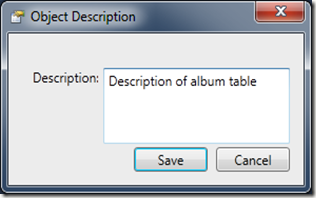
On Database, Table and Column level, there is a new menu item: Edit Description, that allows you to enter a object description. The object description are stored in a table named __ExtendedProperties in the current database.
image

The description is then shown as a tooltip for the object:

image

In addition, you can reuse the data for documentation etc. (I am planning a documentation feature in a future release)

Options dialog for saving options from session to session

image

A new options dialog is available from the main toolbar:

image

SQL Editor improvements

The SQL Editor (again) allows you to display the results in a Grid, rather than text. This can be selected via the Options above. (Using grid will be slower and requires more memory). Also, a Save Script button has been added.

image

Other minor improvements

Latest scripting libraries included, with improvements to Db Diff and primary keys with multiple columns

Thanks to all Toolbox users for your continued encouragement and feedback!

READ MORE - SQL Server Compact Toolbox 2.2–Visual Guide of new features

Thursday, June 2, 2011

Populating a Windows Phone “Mango” SQL Server Compact database on desktop

For up to the minute news, outcries, complaints and cheers on SQL Server Compact, follow me on Twitter: @ErikEJ

If you want to prepopulate a Mango SQL Server Compact database with some data, you can use the following procedure to do this. (Notice, that the Mango tools are currently in beta)

First, define your data context, and run code to create the database on the device/emulator, using the CreateDatabase method of the DataContext. See a sample here. This will create the database structure on your device/emulator, but without any initial data.

Then use the Windows Phone 7 Isolated Storage Explorer to copy the database from the device to your desktop, as described here.

You can now use any tool, see the list of third party tools on this blog, to populate your tables with data as required. The file format is version 3.5. (not 4.0)

Finally, include the pre-populated database in your WP application as an Embedded Resource.

UPDATE: I was made aware, that for read only data, you can just include the database file as Content (not Embedded Resource), and it will be available from the special appdata: URI, with a connection string like the following:

“Data Source=appdata:/Chinook.sdf;Mode=Read Only”

So no need to run code to extract from an Embedded resource as below in that case.

image

You can then use code like the following to write out the database file to Isolated Storage on first run:

public class Chinook : System.Data.Linq.DataContext
{
public static string ConnectionString = "Data Source=isostore:/Chinook.sdf";

public static string FileName = "Chinook.sdf";

public Chinook(string connectionString) : base(connectionString) { }

public void CreateIfNotExists()
{
using (var db = new Chinook(Chinook.ConnectionString))
{
if (!db.DatabaseExists())
{
string[] names = this.GetType().Assembly.GetManifestResourceNames();
string name = names.Where(n => n.EndsWith(FileName)).FirstOrDefault();
if (name != null)
{
using (Stream resourceStream = Assembly.GetExecutingAssembly().GetManifestResourceStream(name))
{
if (resourceStream != null)
{
using (IsolatedStorageFile myIsolatedStorage = IsolatedStorageFile.GetUserStoreForApplication())
{
using (IsolatedStorageFileStream fileStream = new IsolatedStorageFileStream(FileName, FileMode.Create, myIsolatedStorage))
{
using (BinaryWriter writer = new BinaryWriter(fileStream))
{
long length = resourceStream.Length;
byte[] buffer = new byte[32];
int readCount = 0;
using (BinaryReader reader = new BinaryReader(resourceStream))
{
// read file in chunks in order to reduce memory consumption and increase performance
while (readCount < length)
{
int actual = reader.Read(buffer, 0, buffer.Length);
readCount += actual;
writer.Write(buffer, 0, actual);
}
}
}

}
}
}

else
{
db.CreateDatabase();
}
}
}
else
{
db.CreateDatabase();
}
}
}
}
}
READ MORE - Populating a Windows Phone “Mango” SQL Server Compact database on desktop

Monday, May 23, 2011

SQL Server Compact ASP.NET Membership, Role and Profile Provider version 2.1 now available

My ASP.NET membership provider is now available in version 2.1, that contains many improvements and some new features based on excellent community feedback – keep it coming!

The ASP.NET membership provider project was prompted last July by the comments to Scott Gu’s blog post about the upcoming version 4.0 of SQL Server Compact, and it’s support for ASP.NET.

Basically the Gu said: “We are looking to potentially ship a set of providers that work with it (and do not use stored procedures). The first beta won't have this - but it is something we'll hopefully enable in the future.”

So it was time to start coding, since the absence of a Membership provider would make SQL Server Compact less of an attractive option for ASP.NET web sites.

Since then, the database schema used has been refactored to be in line with the ASP.NET 4.0 SQL Server based schema, which resulted in the first NuGet Package being released in January 2011.

Now version 2.1 is available, also via NuGet:

image

Or from the CodePlex site.

The new features in version 2.1 are:
Profile provider included (contrib davidsk)
Two new methods: UpdateUserName and MigrateMembershipDatabaseToAspNet40 (contrib nekno)


Bug fixes (by various contributors, thank you all):
UpdateUser() doesn't set LoweredEmail
GetUser w/ providerUserKey returns invalid information
Static salt leads to deterministic output, dynamic salt is better
Configuration error when using a provider

READ MORE - SQL Server Compact ASP.NET Membership, Role and Profile Provider version 2.1 now available