Pages

Showing posts with label Visual Studio. Show all posts

Monday, June 30, 2014

Getting and building the Entity Framework 7 alpha bits – step by step

The Entity Framework version 7 bits are slowly coming together, for a demo of some features, look at the presentation by Rowan Miller from the Entity Framework Team at the recent dotNetConf.

This blog post will show you how to get the source code and build it on your own machine, in order to better understand EF 7, and maybe give it a early run. Keep in mind that a number of features are still broken/not implemented, keep an eye on the list: https://github.com/aspnet/EntityFramework/wiki/Getting-Started-with-Nightly-Builds

There are instructions on Getting and Building the Code available on the EF7 Wiki: https://github.com/aspnet/EntityFramework/wiki/Getting-and-Building-the-Code

But I have stumbled upon a few issues, that might also hit you.

1: Get the code

You can either do this as clone of the repository as stated in the link above, you you can simply download a .zip file via the Download .zip button on this page.

If you download a .zip, DO use a tool like 7Zip to unpack the file to a folder, do NOT use the built-in Windows zip extractor, in order to avoid files being marked as “Blocked”.

Either way, you will now have a folder called “EntityFramework” on your system, with contents like this:

image

2: Initialize

This will download all the required NuGet packages that EF7 depends on, and reference them from the projects.

Before you do this, launch Visual Studio 2013 and verify that:

You are running VS 2013 Update 2 (check Help, About):

image

In Package Manager Settings, check that the official NuGet feed is configured and enabled (the AspNetVNext feed is added by the build process)

image

Now launch a VS 2013 Developer Command Prompt as Administrator:

image

Now navigate to the “EntityFramework” folder and run:

build initialize

If the build initialize process succeeds, you will see this message:

Build succeeded.

image

If the message does not appear, double check the VS 2013 required settings.

3: Build and run tests

The next step will build the EntityFramework projects, and run all the tests in the solution. Before today, running unit tests were not possible on non-US systems, but I and MrJingle have had a few pull requests accepted to enable this (this, this and this).

Let me know if you encounter any related issues, and I will be happy to submit a pull request to get it fixed.

Again, from a VS 2013 Administrator command prompt, run:

build

If the build process succeeds, you will see this message:

image

4: Work in Visual Studio

You can of course also open the solution in Visual Studio and build there.

In order to run tests in Visual Studio, I found that the built-in Test Window did not detect any tests on my PC, but TestDriven.NET worked well.

You can now add some unit tests of your own in order to give EF7 a run!

Hope you manage to build, and good luck exploring the EF7 source.

READ MORE - Getting and building the Entity Framework 7 alpha bits – step by step

Wednesday, June 18, 2014

SQL Server Compact Toolbox 3.7.3 – Visual Guide of new features

After nearly 290.000 downloads, version 3.7.3 of my SQL Server Compact Toolbox extension for Visual Studio  “14”, 2013, 2012 and 2010 is now available for download. This blog post is a visual guide to the new features included in this release, many suggested by users of the tool via the CodePlex issue tracker.


New features

Export SQL Server database to SQLite script (beta)

This feature enables you to create a script of all tables and data in an existing SQL Server database, that can be run using the SQLite3.exe tool as described in my blog post here, allowing you to quickly migrate to SQLite, for example for use in Windows Store/Phone Apps.

SQLIteExport

“Set Password” option added to Maintenance menu

This feature enables you to set or change the password of an existing database.

setpw

Enable entry of multiline text in DataGridView

This feature allows you to enter multi line text in the data edit grid, by pressing Shift+Enter to get to a new line.

Support for VS “14” CTP

Support for VS “14” was actually already enabled, but there was a minor issue with registration of the simple DDEX providers, that has now been fixed.

UPDATE: Microsoft has blocked add-ins that claim to support VS 14 from VS 2013, so in the meantime you can download a build for VS “14” from here:

https://sqlcetoolbox.codeplex.com/releases/view/123666

image


Bug Fixes

Result Grid column headers were displayed without the first _ (underscore) character if they had one

image

Download Count now fetched async, so the About dialog opens faster.

image

Add Column - defaults to Allow Null

image

"Migrate" and "Export" features broken for large databases with multiple script files

image

image

READ MORE - SQL Server Compact Toolbox 3.7.3 – Visual Guide of new features

Thursday, June 5, 2014

Entity Framework 6 and SQL Server Compact (9) –SqlCeFunctions and DbFunctions

One of the major improvements to the SQL Server Compact Entity Framework provider in version 6 is the addition of the SqlCeFunctions class, and enhanced support for the so-called “canonical” database functions (DbFunctions/EntityFunctions).

Just to repeat, the SQL Server Compact providers are delivered in the EntityFramework.SqlServerCompact (for 4.0) and EntityFramework.SqlServerCompact.Legacy (for 3.5 SP2) NuGet packages.

The DbFunctions (previously named EntityFunctions) in the System.Data.Entity namespace define a set of (CLR) methods that expose conceptual model canonical functions in LINQ to Entities queries.

Before EF6.1, the SQL Server Compact provider only supported the functions defined for Entity Framework 1, not it supports all the functions listed here, except the following: Date/Time functions with micro and nanosecond precision (as only datetime exists as a data type in SQL Server Compact), StDev, StDevP, Var, VarP, Reverse, CurrentUtcDateTime, CurrentDateTimeOffset, GetTotalOffsetMinutes.

This means you can now have the SQL Compact engine excute LINQ to Entities expressions like String.Contains, String.EndsWith, String.Left etc.

The System.Data.Entity.SqlServerCompact.SqlCeFunctions class allows you to call database specific functions directly in LINQ to Entities queries, and the following functions have been implemented (for documentation of these, see the equivalent functions for SQL Server listed here):

String functions
CharIndex
NChar
PatIndex
Replicate
Space
StringConvert
Stuff
Unicode

Math functions
Acos
Asin
Atan
Atan2
Cos
Cot
Degrees
Exp
Log
Log10
Pi
Radians
Rand
Sign
Sin
SquareRoot
Tan

Date functions
DateAdd
DateDiff
DateName
DatePart
GetDate,

Other
DataLength

So you can compose LINQ to Entities queries like:

var result = db.Album.Where(a => SqlCeFunctions.DataLength(a.Title) > 20).ToList();

And the resulting SQL will look like this:


SELECT
    [Extent1].[AlbumId] AS [AlbumId],
    [Extent1].[Title] AS [Title],
    [Extent1].[ArtistId] AS [ArtistId]
    FROM [Album] AS [Extent1]
    WHERE (DATALENGTH([Extent1].[Title])) > 20

READ MORE - Entity Framework 6 and SQL Server Compact (9) –SqlCeFunctions and DbFunctions

Monday, May 12, 2014

Entity Framework ”reboot” – EF7 – Get a sneak peek via TechEd US live stream

The next version of Entity Framework has just been named “EF7” (code name EF EveryWhere). Before the presentation, which will be streamed live on Channel 9 during TechEd US on Wednesday May 14 at 1:30 PM CDT (Houston, Texas), allow me to summarize what we know so far about the next version of Entity Framework.

The Entity Framework team has already published some thoughts about the new Framework here, and based on this and other sources, we can summarize the following (some or maybe most of which is me guessing, of course):

- A completely new codebase, will not be based on the 1 million+ line codebase of EF6

- Will be open source, and accept pull requests and other community feedback

- Will support Windows Phone, Windows Store, Windows Desktop/Server/Cloud, and also support Mono/Xamarin platforms

- Will be based on a provider model, so SQL and NoSQL data sources can “plug in”. Will initially support SQLite on Phone and Store apps. Will also support SQL Server and Azure Table Storage

- Will only include a productive subset of the current, huge API – Code First Mappings, DbContext, POCO classes, and less mapping schemes. So current investments in DbContext, Code First/Second and POCO will be forward reusable.

- Will not contain ObjectContext, Entity SQL, EntityConnection, EntityCommand etc. Phew.

Sounds ambitious and great to me. Can’t wait to see some code and start playing!

UPDATE: The source code is now available on Github as part of ASP.NET vNext. And Rowan Miller, Program Manager on the EF team speaks about and demonstrates EF7 in this TechEd session available online.

READ MORE - Entity Framework ”reboot” – EF7 – Get a sneak peek via TechEd US live stream

Wednesday, March 26, 2014

Entity Framework 6 & SQL Server Compact (7) –New features and fixes in version 6.1

Entity Framework 6.1 is now available on NuGet, and this blog post by Rowan Miller, Program Manager for the Entity Framework team, covers the major new features in this release. Most of the new features are also applicable to SQL Server Compact users, for example Code First Model from Database in the EDM Wizard, which is also available with SQL Server Compact if the latest SQL Server Compact Toolbox version is  installed. Rather than repeating the blog post from Rowan, this blog post will look at some of the minor features in EF 6.1 affecting SQL Server Compact. (A few of which I have had Pull Requests accepted)

#824 Designer: DDL Generation Template for SQL CE should separate each statement with GO

This fix allows you to run the script created by the “Generate Database from Model” EF Tools feature in the latest version of the Toolbox, as described here.

#898 Reverse Engineer Code First: Using database name as entity container name causes issues when database name has invalid chars (bad for SQL Compact)

This fix effectively makes “Code First from Database” work with SQL Server Compact, as it was previously broken.

#1322 SqlCePropertyMaxLengthConvention should be updated to reflect changes in the standard PropertyMaxLengthConvention

This fix makes code more portable between database engines

#1852 Migration for EF 6.0 wrong migration script for altering property (required->non required) for SQL CE 4

This fix ensures that NULL or NOT NULL is always specified in migration SQL when changing between [Required] and not required

#1863 Add DbProvider registration to SQL Server Compact NuGet package

This fix enables private deployment of SQL Server Compact, both for use in desktop, web and unit test scenarios (and makes the workaround I describe here obsolete)

#1878 Add SQL Server Compact 3.5 provider + NuGet package

This feature enables you to use SQL Server Compact 3.5 with Entity Framework 6.x, via the EntityFramework.SqlServerCompact.Legacy NuGet package, and includes all the same fixes and features as the SQL Compact 4.0 provider. I blogged about the new provider earlier.

#1962 SQL Server Compact data provider for EF does not support some Entity SQL canonical functions

It turned out, that the current SQL Server Compact data provider only supported the “canonical” functions defined for EF 1.0  – this fix adds support for most applicable functions from EF 4. The following functions are not supported due the SQL Server Compact having a limited number of data types and built-in functions:  StDev, StDevP, Var, VarP, Reverse, CurrentUtcDateTime, CurrentDateTimeOffset, GetTotalOffsetMinutes, CreateDateTimeOffset, CreateTime, AddMicroseconds, AddNanoseconds, DiffMicroseconds, DiffNanoseconds

READ MORE - Entity Framework 6 & SQL Server Compact (7) –New features and fixes in version 6.1

Friday, March 21, 2014

SQL Server Compact Toolbox 3.7.2–Visual Guide of new features

After more than 260.000 downloads, version 3.7.2 of my SQL Server Compact Toolbox extension for Visual Studio 2013, 2012 and 2010 is now available for download. This blog post is a visual guide to the new features included in this release, many suggested by users of the tool via the CodePlex issue tracker. The focus for this release is a number of features that help improve the experience when using the new support for SQL Server Compact 3.5 (supplied by yours truly) in Entity Framework 6.1 and the related Entity Framework 6.1 Tools.

Run “Generate from Model” script without errors

When using the “Generate Database from Model” option in the Entity Data Model Tools, the tool generates a script to DROP and CREATE the generated objects in the database. If you have tried to run the script until now in the SQL Server Compact Toolbox, the script would fail. A new option “Ignore DDL errors” in the Toolbox SQL Editor will allow you to run the script without any errors:

clip_image001

DDEX install requires VS restart

The simple DDEX providers supplied by the Toolbox for VS 2012 and VS 2013 are installed when the Toolbox is activated, and therefore require VS to be restarted to be used. A notification is now available to notify you of this. You can read more about the DDEX providers in my previous blog post here and here.

clip_image002

(Also, notice the new, “modern” icons in the toolbar of the Toolbox.)

Preserve SQL Server date types

A new option is now available to control scripting of the SQL Server date, datetime2 and datetimeoffset data types. The default behaviour is to always convert these column types to datetime (SQL Server Compact does not have these datatypes). But this can cause data loss (as datetime has limited precision) or overflow errors, as datetime only supports dates from 1753 to 9999, unlike date, datetime2 and datetimeoffset, that all support dates from 0001 to 9999.

clip_image003

Improved About dialog

The About dialog has been improved for readability, and contains a counter for the current number of Toolbox downloads:

clip_image004

Bug fixes

EDMX generation feature failed if only VS 2012 and not VS 2013 was installed.

"Refresh" of tables, including refresh after schema changes, was broken

Scripting API improvements

- improved SQLCE runtime check

- datetimeoffset columns scripted as datetime by default now, not nvarchar()

- sql_variant and hierarchyid handling improved, to avoid getting wrong ordinal for identity and timestamp

- sqlite indexes are now always given unique names

The scripting API improvements are also included in the latest version of my SQL Compact command line export tool and Scripting API, available here.

Feedback

As usual, please provide feedback if you have any feature requests, ideas or encounter any issues (or even bugs!!) by using the CodePlex Issue tracker.

READ MORE - SQL Server Compact Toolbox 3.7.2–Visual Guide of new features

Monday, March 10, 2014

Entity Framework 6 & SQL Server Compact (6)–Entity Framework Reverse POCO Code First Generator

The Entity Framework Reverse POCO Code First Generator is a customizable T4 template, that reverse engineers an existing database and generates Entity Framework Code First POCO classes, Configuration mappings and DbContext It is available directly in Visual Studio via the Tools, Extensions and Updates menu item. It can be used with VS 2010 or later, and the latest version supports Entity Framework 6 and both SQL Server and SQL Server Compact (both 3.5 and 4.0).

This T4 template is similar to the Entity Framework Power Tools “Reverse Engineer Code First” feature, but much more versatile and flexible, and constantly updated by the developer. You can see how this project compares with the Power Tools feature here.

To get started using the template with SQL Server Compact, follow these simple steps:

Install the relevant Entity Framework NuGet package:

  • EntityFramework.SqlServerCompact.PrivateConfig (EF 6.0.2 with SQL CE 4.0)
  • EntityFramework.SqlServerCompact (EF 6.1 when released with SQL CE 4.0)
  • EntityFramework.SqlServerCompact.Legacy (EF 6.1 when released with SQL CE 3.5 – currently available as beta)

Add a connection string to your app.config/web.config:

<connectionStrings>
<add name="MyDbContext"
providerName="System.Data.SqlServerCe.4.0"
connectionString="Data Source=C:\data\mydb.sdf" />
connectionStrings>

In Visual Studio, right click project and select "add - new item".

Select Online, and search for "reverse poco". 


Select the "EntityFramework Reverse POCO Code First Generator" template


Give the file a name, such as Database.tt and click Add.


Edit the Database.tt file and specify the connection string name as "MyDbContext" which matches your name in app.config.


Save the Database.tt file, which will now generate the Database.cs file.


There are many options you can use to customise the generated code. All of these settings are in the Database.tt files with comments attached.

READ MORE - Entity Framework 6 & SQL Server Compact (6)–Entity Framework Reverse POCO Code First Generator

Friday, February 28, 2014

Entity Framework 6 (& SQL Server Compact) (5)–Entity Framework 6 extensions

This is a list of some of all the nice Entity Framework 6 extensions out there that expand the functionality of the Entity Framework 6 runtime. Code generator tools and Frameworks using Entity Framework are not included here, only libraries that extend DbContext or similar.

The EF team has lists of Tools and 3rd party EF providers here: http://msdn.microsoft.com/en-us/data/ee712907

Please let me know if I have missed anything, and I will add it to the list.


Store Functions for EntityFramework CodeFirst
 

Why: This project uses the basic building blocks to build end to end experience allowing using TVFs in Linq queries and invoking stroed procedures without having to drop down to SQL. (By EF Team member)
Project: https://codefirstfunctions.codeplex.com/
NuGet: Coming soon


Interactive Pre-Generated Views for Entity Framework 6

Why: An alternative is a solution where views are created dynamically only when needed (i.e. views don't exist or are out dated) and then persisted and made available for use by other instances of the same application (be it running in parallel or the same application after a restart). This is exactly the problem Interactive Pre Generated Views project is trying to solve. (By EF Team member)
Project: https://efinteractiveviews.codeplex.com/
NuGet: https://www.nuget.org/packages/EFInteractiveViews

Second Level Cache for Entity Framework 6.1

Why: Entity Framework does not currently support caching of query results. A sample EF Caching provider is available for Entity Framework version 5 and earlier but due to changes to the provider model this sample provider does not work with Entity Framework 6 and newer. This project is filling the gap by enabling caching of query results for Entity Framework 6.1 applications.  (By EF Team member)
Project: https://efcache.codeplex.com/
NuGet: http://www.nuget.org/packages/EntityFramework.Cache


Entity Framework 6 Contrib

Why: https://ef6contrib.codeplex.com/documentation
Project: https://ef6contrib.codeplex.com/
NuGet: https://www.nuget.org/packages/EF6.Contrib/


Entity Framework Extended Library

Why: Batch Update and Delete, Future Queries, Query Result Cache, Audit Log

Nuget: http://www.nuget.org/packages/EntityFramework61.Extended (forked)
and http://www.nuget.org/packages/EntityFramework6.Extended (forked)
and https://www.nuget.org/packages/EntityFramework.Extended/
Project: https://github.com/loresoft/EntityFramework.Extended and https://github.com/AdvancedREI/EntityFramework.Extended


EntityFramework.Utilities

Why: EntityFramework.Utilities provides some batch operations for using EF that the EF team hasn't yet added for us. (CUD)
Project: https://github.com/MikaelEliasson/EntityFramework.Utilities
NuGet: https://www.nuget.org/packages/EFUtilities/


EntityFramework.BulkInsert

Why: Bulk insert extension for EntityFramework. Insert large amount of data over 20 times faster than regular insert. Supports DB first and code first.
Project: https://efbulkinsert.codeplex.com/
NuGet: https://www.nuget.org/packages/EntityFramework.BulkInsert-ef6


Trackable Entities

Why: Visual Studio 2012 and 2013 project templates and NuGet packages for client-side entity change-tracking and server-side persistence with Entity Framework extensions.
Project: https://trackable.codeplex.com/
NuGet: https://www.nuget.org/packages/TrackableEntities.EF.6/

EntityFramework.MappingAPI

Why: EntityFramework mapping API gives you ability to know the database info behind the context.
Project: https://efmappingapi.codeplex.com/
NuGet: https://www.nuget.org/packages/EntityFramework.MappingAPI

EntityFramework.Filters

Why: Create and configures filters applied to queries across a DbContext
Project: https://github.com/jbogard/EntityFramework.Filters
NuGet: https://www.nuget.org/packages/EntityFramework.Filters/

EntityFramework.Seeder

Why: Using EntiyFramework.Seeder, you can seed your database from CSV files.
Project: https://github.com/dpaquette/EntityFramework.Seeder/
NuGet: https://www.nuget.org/packages/EntityFramework.Seeder.EF6/

READ MORE - Entity Framework 6 (& SQL Server Compact) (5)–Entity Framework 6 extensions

Tuesday, February 11, 2014

SQL Server Compact Toolbox 3.7.1–Visual Guide of new features

After 250.000 (!) downloads, version 3.7.1 of my SQL Server Compact Toolbox extension for Visual Studio 2013, 2012 and 2010 is now available for download (and available via Tools/Extensions in Visual Studio). This blog post is a visual guide to the few new features included in this minor release, which all centre around Server Explorer (DDEX) , including support for Visual Studio 2012 and 2013.


Simple DDEX providers for Visual Studio 2012 and 2013

image

I already blogged about this feature here, it has been extended to also support SQL Compact 3.5. Follow these steps to use the providers with Entity Framework Tools:

- Install this version of the toolbox and launch Visual Studio 2012/2013.
- Open the Toolbox (this will silently run the “installation” of the DDEX provider if required).
- Restart VS 2012/2013.
- Add new Toolbox connection to a new or existing SQL Server Compact 4.0 or 3.5 database file.
- Add EntityFramework.SqlServerCompact or EntityFramework.SqlServerCompact.Legacy NuGet package to project and build project.
- You can now use this connection for Generate Model from Database, Generate Database from Model and Update Model from Database, and with the Power Tools.

With this release, the DDEX support matrix looks like this:

  SQL Server Compact 3.5 SQL Server Compact 4.0
Visual Studio 2010 Microsoft None
Visual Studio 2010 SP1 + SQL CE 4.0 Tools Microsoft Microsoft
Visual Studio 2012 ErikEJ Microsoft
Visual Studio 2013 ErikEJ ErikEJ

“Microsoft” means full featured, Microsoft supplied provider
ErikEJ” means simple, basic support, enough to enable Entity Framework Tools, provided by this version of SQL Server Compact Toolbox.

Currently, the 3.5 DDEX provider does not fully work with the Entity Framework Tools, due to a bug (my bug!) in the EntityFramework.SqlServerCompact.Legacy Entity Framework provider; I am working on getting it fixed.

Scan Solution for sdf files

This new menu item will scan the active Solution for any sdf files, and add those to the Toolbox:

image

Prefer DDEX

image

This new option allows you to always use the Toolbox supplied dialogs for connecting to a SQL Server Compact database file, which will allow you to connect to any file, and does not require an .sdf file type. (By choosing not to prefer!)

Bug fixes and enhancements

Add connection will now always use DDEX provider if available
Handle apostrophe in file and folder names when saving connections
Fixed error: The specified table does not exist. (Databases)
Make it clearer that sqlmetal dependent features requires 3.5 to be installed

Please report any issues you encounter and provide feature suggestions and requests here.

READ MORE - SQL Server Compact Toolbox 3.7.1–Visual Guide of new features

Monday, February 3, 2014

Entity Framework 6 & SQL Server Compact 4.0 (4) - Restoring full EF Tools support in Visual Studio 2013

As described in my blog post here, Entity Framework Tools support for SQL Server Compact 4.0 in Visual Studio 2013 is broken, because SQL Server Compact is no longer supported by Server Explorer in VS 2013. The latest release of my SQL Server Compact Toolbox, version 3.7.1, currently available in beta release from here, restores the Entity Framework Tools support for SQL Server Compact 4.0 by installing a simple DDEX provider.

Developing DDEX providers is a bit of a dark art, which has put me off even thinking about it, but a recent discussion on CodePlex drew my attention to the DDEX sample provider included with the Entity Framework source code. In particular the fact that the Entity Framework Tools does not get any information from the DDEX provider apart from the connection information, so all Tables, Columns etc. are enumerated via code in the Entity Framework provider, not the DDEX provider. Quote from the included Word document: “Thus, the information shown in the wizard GUI comes directly from the EF provider. The wizard lets users select which tables, views and stored procedures to include in the model”.

So my “simple” provider enables you to use the Entity Framework Tools, for example “Generate Model from Database”, “Generate Database from Model”, “Update Model from Database” and also the EF Power Tools Reverse engineer feature. (Soon to be included directly in the EF Tools).

Once the DDEX Provider has been installed, (which consists of placing the provider DLL on disk, and add a number of registry entries), you can add a connection to any SQL Server Compact 4.0 database from the Toolbox, and it will be added to Server Explorer:

image

(If you do not see the label at the bottom, but potentially a warning instead, one of the requirements for using the provider have not been fulfilled)

The requirements for the provider are:
- Visual Studio 2013 Pro or higher (it is not possible to add 3rd party DDEX providers to any Express edition, please correct me if I am wrong)
- The Simple DDEX provider must be registered (may require a VS restart after launching with version 3.7.1 the first time), you can verify via About dialog in Toolbox.
- The 4.0 DbProvider must be properly registered, use the About dialog in the Toolbox to confirm:

image

Finally, you can of course confirm the presence of the provider in the Server Explorer Choose Data Source dialog:

image

To connect via Server Explorer, select the “SQL Server Compact 4.0 (Simple by ErikEJ)” data source, click continue, and all you normally would need to enter is the path to the database file:

image

Notice that this UI does not let you create a new database file, but you can do that from the “Add Connection…” dialog in the Toolbox.

With that in place, you have access to the exact same Entity Framework Tools features that you had in Visual Studio 2012. Happy coding (and please let me know if your encounter any issue with this feature)

READ MORE - Entity Framework 6 & SQL Server Compact 4.0 (4) - Restoring full EF Tools support in Visual Studio 2013

Thursday, January 23, 2014

Entity Framework 6 & SQL Server Compact (3)–Getting started with the SQL Server Compact 3.5 provider (and Merge Replication)

As you may know, SQL Server Compact version 4.0 does not have support for Merge Replication and Remote Data Access (you can still use RDA, however). This was a showstopper if you wanted to use the latest version of Entity Framework, as up until now, only SQL Server Compact version 4.0 was supported with Entity Framework 5 and 6. But now a SQL Server Compact 3.5 provider for Entity Framework 6 is available, currently as pre-release on NuGet.

The new 3.5 provider is based on the exact same codebase as the 4.0 provider, and thus has all the new features (SqlCeFunctions, Migrations etc.), bug fixes and performance improvements included in the 4.0 provider. In addition, this new provider supports IDENTITY Keys, just like the 4.0 provider. (A showstopper for many with the present 3.5 provider). As it is based on the same codebase as the 4.0 provider, any future improvements and bug fixes will also be included with this provider.

This blog post will describe how you can get started with the new 3.5 provider with Entity Framework 6, and will also include some pointers on getting started with Merge Replication. I will assume that you have Visual Studio 2012 or 2013 Professional or higher installed, and also have my SQL Server Compact Toolbox add-in installed. If you are using Visual Studio 2012 and Database First, you must also have the Entity Framework 6.0.2 Tools installed, download from here. And of course you must have the SQL Server Compact 3.5 SP2 Desktop runtime installed.

So let us create a new console app, that uses Entity Framework 6 and SQL Server Compact 3.5, and which could potentially be a Merge Replication subscriber.

Create a new Console project:

image

For this walkthrough, we will use Database First, but you can of course also use Code First.

Add the EntityFramework.SqlServerCompact.Legacy NuGet package to the project (remember to allow pre-releases), by right clicking the project and selecting Manage NuGet Packages…

image

This will install Entity Framework 6.1-alpha1 and the 3.5 provider and add the required registration in app.config.

Build the project.

Connect/create the database that you want to use in the SQL Server Compact Toolbox, right click it, and select “Add Entity Data Model to current Project”

image

Just click OK:

image

This will add Chinook.edmx and invoke code generation that builds a DbContext derived class and POCO classes for each table in your database.

You can now add Merge Replication to your solution, you can start by installing my Merge Replication client helper library via NuGet, http://www.nuget.org/packages/ErikEJ.SqlCeMergeLib/, read more about it here: https://sqlcemergelib.codeplex.com/

In order to configure Merge Replication on your SQL Server database and web server, I have a brief blog post here, but otherwise I can highly recommend the book by Rob Tiffany.

Notice that if you want to add Merge Replication to a SQL Server 2012 database, you need SP1 and CU4 or later, and you will need a recent build (8088 or newer) of the SQL Server Comapct 3.5 runtime installed, as listed in my blog post here.

Hopefully you will now be able to get started with this combination of the latest Microsoft data access technology and  “legacy” technologies like Merge Replication and Sync Framework. If you have any questions, please ask in the MSDN forum or Stack Overflow.

READ MORE - Entity Framework 6 & SQL Server Compact (3)–Getting started with the SQL Server Compact 3.5 provider (and Merge Replication)

Friday, January 10, 2014

SQL Server Compact Toolbox 3.7–Visual Guide of new features

After more than 235.000 downloads, version 3.7 of my SQL Server Compact Toolbox extension for Visual Studio 2013, 2012 and 2010 is now available for download (and available via Tools/Extensions in Visual Studio). This blog post is a visual guide to the new features included in this release, many suggested by users of the tool via the CodePlex issue tracker. A major “theme” for this release has been to improve the experience for Visual Studio 2013 users, which has no Server Explorer/DDEX support for SQL Server Compact at all.

Add Column, Index and Foreign Key to table

As Server Explorer support is completely missing in VS 2013, and only available for 4.0 in VS 2012, I have added dialogs for building script to add columns, indexes and foreign keys to a table. Right click any table, and select the desired dialog:

image

image

image

  image

Note that currently the Index and Foreign Key dialogs only support a single column, I am aware of this, so please vote here and/or here.

Generate Entity Framework 6 Entity Data Model with VS 2012 and SQL Compact 3.5

The code generation menu items have now been moved to a sub-menu:

image

In addition, as the Entity Framework Tools are now available for Visual Studio 2012 as well as Visual Studio 2013, it is now possible to generate a “database first” Entity Framework model (EDMX) based on a SQL Server Compact database in VS 2012. And I have just contributed an Entity Framework SQL Server Compact 3.5 provider (available as prerelease on NuGet), that allows you to use SQL Server Compact 3.5 with Entity Framework 6. 

Copy database file

It is now possible to copy a database file, and then for example paste it into your project, should you so desire, simply by pressing Ctrl+C on the selected database, or selecting the context menu item:

image

Data only export to SQL Server

The current data export feature has been enhanced to support SQL Server and IDENTITY columns by using DBCC CHECKINDENT instead of the unsupported ALTER TABLE statements currently used.

image

New "ALTER column" context menu item

To help you modify columns, a new context menu to script ALTER COLUMN statements has been added:

image

“Database designer”

I am now hosting a web based database designer based on http://code.google.com/p/wwwsqldesigner/ (which implements only the SQL Server Compact column data types). Current state is “alpha” (and there are known issues with IE 11)!

Server DGML now has table selection
When generating a database diagram for a SQL Server database, you can now select which tables to include in the graph, which can be helpful when diagramming databases with many tables. I have already blogged about this earlier.
Other improvements and bug fixes

Missing database files indicated in tree view
No longer depends on the SQL Server Compact 3.5 runtime, and no longer depends on DbProviderFactory, simply requires either 3.5 or 4.0 in GAC
Each Query opens in new window
BUG: "Upgrade to 4.0" was blocked in Visual Studio 2013
BUG: Not ideal support for Dark Theme in VS 2012/2013 (improved slightly)
BUG: EF6 EDMX code generation with VB was broken

READ MORE - SQL Server Compact Toolbox 3.7–Visual Guide of new features

Friday, November 15, 2013

Entity Framework 6 & SQL Server Compact 4 (1)–Workflows and tooling

In this new series, I will give an introduction to the new tooling and some of the new features in Entity Framework 6 (EF6). But lets begin with an overview of workflow and tooling option in the various Visual Studio versions, that EF6 supports.

EF6 consist of 2 major parts:

- the EF6 runtime, available via NuGet, which support Visual Studio 2010, 2012 and 2013 (version 6.0.0. of the runtime is included in the VS 2013 install, but always update to the latest released NuGet version)

- the EF Tools, which is mainly the Entity Data Model Wizard and the graphical EDMX editor and Model Browser in Solution Explorer. The EF Tools have been updated and are included with VS 2013, and you can also grab the EF6 Tools for Visual Studio 2012 here. For VS 2010, there are no updated tools.

Pawel Kadluczka (@moozzyk) from the Entity Framework team has posted an excellent, detailed blog post about changes to the tooling.

Workflows

As you may be aware, there are 4 available workflows available with Entity Framework:

Database First, where you reverse engineer an Entity Data Model (EDMX) from an existing database.

Model First, where you “draw” the data model in an empty EDMX, and the can generate database objects based on the model.

Code First, where you define data classes, and either decorate with attributes of use fluent configuration, and also define a class that inherits from DbContext.

Code Second, where you generate Code First classes based on an existing database. You can use for example the EF Power Tools to do this

You can get more information about the different workflows and how to choose one here.

SQL Compact workflows in Visual Studio

In this section I will describe how to perform each workflow in VS 2010, 2012 and 2013, as there are differences due to varying degrees of tooling support. For any of the workflows below, the first thing to do is install the Entity Framework 6 SQL Server Compact NuGet package in your project, the package name is EntityFramework.SqlServerCompact:
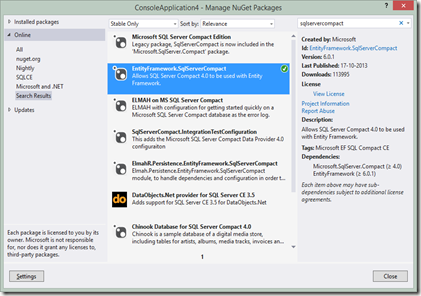
image

This package will add the following references to your project:

EntityFramework

EntityFramework.SqlServer (not needed for our scenarios)

EntityFramework.SqlServerCompact

System.Data.SqlServerCe (not really needed for EF scenarios)

- the reason why System.Data.SqlServerCe is not needed, is that EF6 relies on the DbProviderFactory registration of SQL Server Compact, either in machine.config or your app.config/web.config.

The package will also add required app/web .config settings in the current project, to register the SQL Server Compact Entity Framework provider for EF6. (Not the DbProvider registration, but I have a solution for that in my next blog post)

Visual Studio 2010

Since the EF6 Tools are not available for VS 2010, the only available workflow using Entity Framework 6 (which fully supports .NET 4.0) is Code First. There is an overview of Code First with SQL Server Compact, EF6 and VS 2010  available here on CodeProject. (You can of course continue to use the EF designer with EF 4 based projects). I also have a blog post on Code First here.
Please note that my recommend approach is simply to install the EntityFramework.SqlServerCompact package first, as this will include all other required packages in the project for you, rather than installing the EntityFramework package first as done in the CodeProject blog post.

Visual Studio 2012

VS 2012 has a DDEX (Server Explorer) provider for SQL Server Compact, which makes all workflows simple.

Database First: Connect to a database file in Server Explorer, and then add an “ADO.NET Entity Model” to your project. (Or connect to/create one during the wizard)

Model First: Add an Empty “ADO.NET Entity Model” to your project. Add entities etc. to the Model. When prompted during script generation (Generate Database from Model), connect to or create a SQL Server Compact database file. I have a fix for the .tt script template to make the generated script more compatible with the Toolbox. My fix will be included with the EF 6.1 tooling.

Code Second: Install the Entity Framework Power Tools from Tools/Extensions (I believe they require the EF6 Tools to be installed to work)

Visual Studio 2013

VS 2013 has no DDEX (Server Explorer) provider for SQL Server Compact, which makes all workflows a bit more complicated.There is a VS UserVoice item to bring back the DDEX provider, if you feel like voting for it.

UPDATE: The latest version of my Toolbox add-in (3.7.1, currently in beta) now installs a simple DDEX provider in VS 2013, that enables the same workflows as in VS 2012 described above. Download from here and read the release notes carefully.

Database First: Install my SQL Server Compact Toolbox add-in via Tools/Extensions. Also install SQLCE 3.5 SP2 and SQLCE 4.0 SP1 if not already present. Right click the database and create an Entity Data Model from the context menu.

Model First: Install my SQL Server Compact Toolbox add-in via Tools/Extensions. Also install SQLCE 3.5 SP2 and SQLCE 4.0 SP1 if not already present. Create an empty database file. Right click the database and create an Entity Data Model from the context menu. Add entities etc. to the Model. A SQL Compact compatible script will be generated when selecting “Generate Database from Model”. I have a fix for the .tt script template to make the generated script more compatible with the Toolbox.

Code Second: I am working on getting a pull request accepted for the EntityFramework Reverse POCO Code First Generator project. This project is an alternative to the EF Power Tools Reverse Engineer feature, but presently does not support SQL Server Compact. Once it has been accepted, you can generate Code Second classes from a SQL Server Compact database file with this tool. UPDATE: Latest version of this template now supports SQL Server Compact

NEXT: Easy Private Desktop Deployment with SQL Server Compact and Entity Framework 6.

READ MORE - Entity Framework 6 & SQL Server Compact 4 (1)–Workflows and tooling

Monday, November 11, 2013

SQL Server Compact breaks when upgrading from Windows 8 to Windows 8.1

Symptoms

1: The SQL Server Compact Toolbox now longer works after upgrading to Windows 8.1

2: Entity Framework based SQL Server Compact solutions no longer work after upgrading to Windows 8.1

Issue

When upgrading a machine that already has SQL Server Compact 3.5 SP2 and/or 4.0 installed, the DbProvider registration, which is stored in machine.config is broken, probably due to the fact, that a newer version of .NET Framework is installed (version 4.5.1) which simply overwrites the existing maching.config file. Both the SQL Server Compact Toolbox and Entity Framework depend on this registration.

Fix

The fix is to repair/re-install SQL Server Compact 3.5 SP2 and/or 4.0 SP1, both versions are fully supported on Windows 8.1/Windows Server 2012 R2.

You can download 3.5 SP2 from here: http://www.microsoft.com/en-us/download/details.aspx?id=5783

You can download 4.0 SP1 from here: http://www.microsoft.com/en-us/download/details.aspx?id=30709

READ MORE - SQL Server Compact breaks when upgrading from Windows 8 to Windows 8.1

Friday, October 25, 2013

SQL Server Compact Toolbox 3.6–Visual Guide of new features

After more than 210.000 downloads, version 3.6 (skipping version 3.5 to avoid confusion) of my SQL Server Compact Toolbox extension for Visual Studio 2013, 2012 and 2010 is now available for download. This blog post is a visual guide to the new features included in this release, many suggested by users of the tool via the CodePlex issue tracker


Table Builder

In order to improve the experience for Toolbox users, I have now started adding features to the Toolbox found in the Server Explorer tooling, starting with a Table Builder. This is due to the fact, that Server Explorer support in VS 2012 and VS 2013 is limited (in 2012 SQL Compact 4.0 only, and in VS 2013 none, where as Server Explorer in VS 2010 supports both 3.5 and 4.0).

To use the Table Builder, right click a database, and select Build Table:

image

Then specify the columns to be built, and click Script!

image

A CREATE TABLE script will then be displayed in the SQL editor. In the current version, it is not possible to modify an existing table, maybe next time?

If you have both VS 2012 and VS 2013, feel free to contact me for a way to re-enable Server Explorer support for SQL Server Compact 4.0 in VS 2013.

Report Viewer

You can now view the data in any table via the Microsoft Report Viewer, which also enables you to export data in Excel, Word and PDF format.

image

Right click any table, and select View Data as Report

image

You can right click the report (or use the Toolbar) to Print/Export the table data.

This featured is based on this Stackoverflow reply: http://stackoverflow.com/questions/267091/best-way-to-view-a-table-with-lots-of-columns

Generate Entity Framework 6 Entity Data Model (EDMX) in Visual Studio 2013

This feature is very similar to the existing feature for Visual Studio 2010, allowing you to do Database First development with SQL Server Compact and Entity Framework 6. The new implementation for Visual Studio 2013 takes advantage of assets from the version 6 Entity Framework designer, this includes using the included .tt files to code generate a DbContext and related POCO classes rather than a legacy ObjectContext. To use this feature, first install the EntityFramework.SqlServerCompact NuGet package in your project, and the simply right click the database you would like to generate the model for:

image

image

Then you will be presented with a very basic “Entity Data Model” dialog, which allows you to select which tables to include in the model, and to specify other relevant options:

image
Clicking OK will generate an EDMX file and releated .tt files etc, in the project based on the Entity Framework 6 designer way of doing this. image

Other improvements and bug fixes

Scripting: Improved parsing of SELECT statements
Scripting; Proper scripting of float and real values
Scripting: Fixed some schema diff scripts bugs
UI: Improved display of database size and space available
Integration: Improved VS 2013 RTM support

READ MORE - SQL Server Compact Toolbox 3.6–Visual Guide of new features

Friday, July 19, 2013

SQL Server Compact Code Snippet of the Week #18 : handling SqlCeExceptions

Often I see developers complain that the error messages from SQL Server Compact does not provide any information about the error (in SqlCeEcxeption.Message). This is due to to way that the SqlCeException object is shaped, as it contains a SqlCeErrors collection and other properties you must inspect in order to get “full disclosure” on the error information. Getting this complete information of course helps a lot in troubleshooting the root causes for the errors. (The exact same pattern applies to SqlException, which also has a collection of SqlCeErrors)

Remember in your error handling to catch any specialized exceptions (like SqlCeException) before the more general Exception object:

            try
{
//Data access code here
}
catch (SqlCeException scx)
{ }
catch (Exception ex)
{ }


For getting full error information, I use the code below:

        public static string ShowErrors(System.Data.SqlServerCe.SqlCeException e)
{
System.Data.SqlServerCe.SqlCeErrorCollection errorCollection = e.Errors;

StringBuilder bld = new StringBuilder();
Exception inner = e.InnerException;

if (!string.IsNullOrEmpty(e.HelpLink))
{
bld.Append("\nCommand text: ");
bld.Append(e.HelpLink);
}

if (null != inner)
{
bld.Append("\nInner Exception: " + inner.ToString());
}
// Enumerate the errors to a message box.
foreach (System.Data.SqlServerCe.SqlCeError err in errorCollection)
{
bld.Append("\n Error Code: " + err.HResult.ToString("X", System.Globalization.CultureInfo.InvariantCulture));
bld.Append("\n Message : " + err.Message);
bld.Append("\n Minor Err.: " + err.NativeError);
bld.Append("\n Source : " + err.Source);

// Enumerate each numeric parameter for the error.
foreach (int numPar in err.NumericErrorParameters)
{
if (0 != numPar) bld.Append("\n Num. Par. : " + numPar);
}

// Enumerate each string parameter for the error.
foreach (string errPar in err.ErrorParameters)
{
if (!string.IsNullOrEmpty(errPar)) bld.Append("\n Err. Par. : " + errPar);
}
}
return bld.ToString();
}

READ MORE - SQL Server Compact Code Snippet of the Week #18 : handling SqlCeExceptions

Saturday, June 29, 2013

SQL Server Compact Toolbox 3.4–Visual Guide of new features

After nearly 190.000 downloads, version 3.4 of my free, open source SQL Server Compact Toolbox extension for Visual Studio 2013, 2012 and 2010 is now available for download. This blog post is a visual guide to the new features included in this release, many suggested by users of the tool via the CodePlex issue tracker


Data compare

The major new feature of this release is the table based data compare feature, that will generate a script with INSERT, UPDATE and DELETE statements to make two tables contains the same data. The two tables must have compatible schemas and same names. The feature works across both SQL Server and SQL Server Compact tables.

To try out this new (beta) feature, right click on a table and select “Compare Data…”:

clip_image002

Select the target database:

clip_image003

A script with the required statements will then open in the SQL editor.

Database Information

This feature will script information about the selected database in the SQL editor, both general information about the database, including Locale ID and case sensitivity, and also list number of rows for all user tables.

clip_image004

clip_image005

Maximum column width in Edit grid

This new option allows you to set a limit on the column width in the edit grid, useful if you have some columns with very long text string, and you want them all to be visible.

clip_image007

After setting the option to for example 200 pixels:

clip_image009

Visual Studio 2013 support

Server Explorer in Visual Studio 2013 no longer supports SQL Server Compact 4.0, and other tools that depend on Server Explorer (DDEX) will no longer work with SQL Server Compact 4.0. However, you can still use the SQL Server Compact Toolbox in Visual Studio 2013, both with version 3.5 and 4.0 database files. The only requirement is that you have the relevant SQL Compact runtime MSIs installed. In addition, the Toolbox supports code generation of LINQ to SQL DataContext classes, both for Windows Phone 7.5/8 and Desktop apps. For Entity Framework, no code generation is required provided you use the Code First workflow.

clip_image010

Other improvements and bug fixes

Validate Connections improved
Merge Replication save properties fixed
CSV import unicode issue fixed + improved error message
milliseconds included in datetime in text results
SQLite script contained GO separators, they are no longer there
Avoided scripting spatial indexes (SQL Server scripting)

READ MORE - SQL Server Compact Toolbox 3.4–Visual Guide of new features